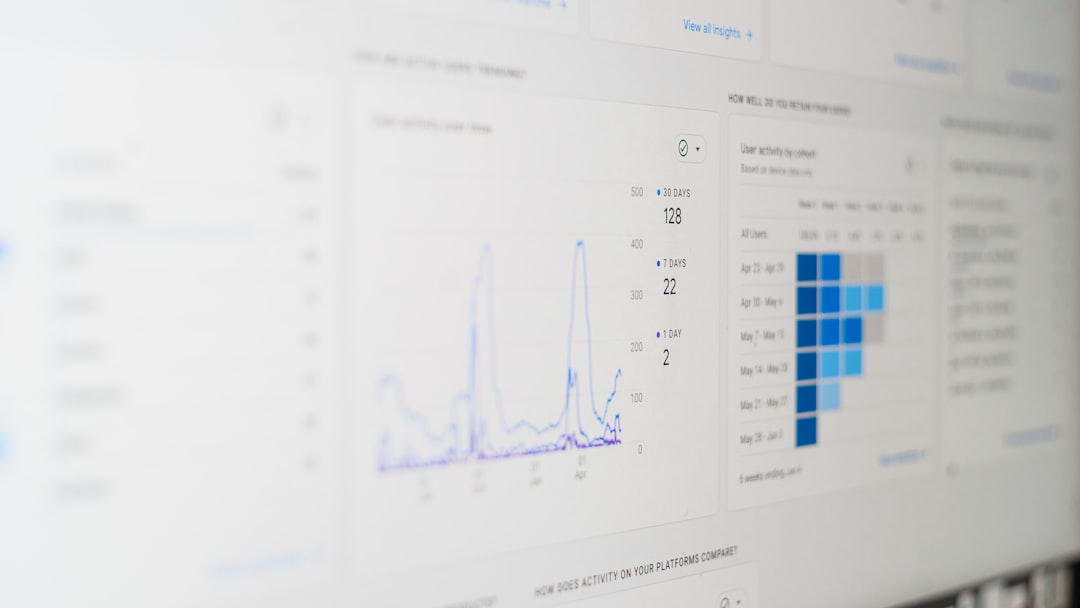

Email newsletters remain one of the highest ROI marketing channels available today, but success depends on more than simply hitting “send.” To truly optimize performance, you need deep insights into subscriber behavior—who opens, who clicks, and who quietly drifts away. That’s where newsletter analytics tools come in. The right platform can transform raw data into actionable strategies that improve engagement, strengthen relationships, and drive measurable results.
TLDR: If you want better newsletter performance, you need tools that accurately track opens, clicks, engagement patterns, and subscriber behavior. Mailchimp, Campaign Monitor, ConvertKit, and HubSpot stand out for their powerful analytics dashboards and link tracking features. Each platform offers unique strengths depending on whether you prioritize automation, visual reporting, creator tools, or advanced CRM integration. Choosing the right one depends on your business goals and growth strategy.
Why Newsletter Analytics Matter
Tracking analytics isn’t just about vanity metrics. While open rates and click-through rates (CTR) are useful starting points, modern newsletter analytics go much deeper. The best tools provide insight into:
- Engagement over time — Identify trends and seasonal shifts.
- Device and location data — See how and where users engage.
- Individual subscriber behavior — Discover your most loyal readers.
- Link-level tracking — Determine precisely which content drives clicks.
- Automation performance — Measure the success of drip sequences.
Armed with these insights, marketers can refine subject lines, adjust content strategy, improve targeting, and increase conversions.

Top 4 Newsletter Analytics Tools
1. Mailchimp
Best for: Small to mid-sized businesses seeking an all-in-one marketing platform.
Mailchimp remains one of the most widely used email marketing platforms, and its analytics capabilities are a major reason why. The dashboard provides a clean overview of campaign performance, including open rates, click rates, revenue tracking (for ecommerce), and audience growth metrics.
Key Analytics Features:
- Real-time reporting dashboard
- Click maps showing where users engage most
- Comparative campaign reports
- Audience segmentation performance
- A/B testing insights
Mailchimp’s comparative reporting tool is particularly valuable. It allows marketers to analyze multiple campaigns at once to identify patterns in subject lines, send times, and content themes.
While open rate tracking has become less precise due to privacy changes (like Apple Mail Privacy Protection), Mailchimp adapts by emphasizing click tracking and behavioral data to provide more reliable metrics.
2. Campaign Monitor
Best for: Businesses focused on visual reporting and client-ready analytics.
Campaign Monitor excels in clean data presentation. Its analytics dashboard is intuitive, visually appealing, and highly digestible—perfect for teams that need to present results to stakeholders or clients.
Standout Features:
- Advanced link tracking and click heatmaps
- Geolocation tracking
- Device breakdown reporting
- Subscriber engagement segmentation
- Conversion tracking integrations
The click heatmap is especially useful. It overlays performance data directly onto your newsletter layout, showing precisely where subscribers are clicking. This can reveal unexpected insights—for example, users may be clicking images more than buttons.

Campaign Monitor is also strong in engagement-based segmentation. You can automatically label subscribers as “highly engaged,” “at risk,” or “inactive” and tailor campaigns accordingly.
3. ConvertKit
Best for: Creators, bloggers, and digital entrepreneurs.
ConvertKit focuses heavily on audience relationships and lifecycle engagement. While its interface is simpler than some enterprise tools, it provides powerful insights into subscriber behavior over time.
Notable Analytics Features:
- Subscriber-level engagement tracking
- Visual automation reporting
- Link trigger tracking
- Growth trend analysis
- Tag-based performance insights
One of ConvertKit’s strongest features is its tag and automation analytics. Instead of just measuring campaign-wide metrics, you can see how specific audience segments respond to content based on interests or behaviors.
For creators selling courses, memberships, or digital products, ConvertKit’s integration with purchase tracking offers valuable insight into which emails directly drive revenue.
Additionally, its visual automation builder displays performance metrics directly within email sequences, making it easy to identify drop-off points or underperforming emails.
4. HubSpot Email Marketing
Best for: Businesses needing advanced CRM-integrated analytics.
HubSpot goes beyond standard newsletter analytics by integrating email performance with full customer journey tracking. This makes it a powerful solution for sales-driven organizations.
Advanced Capabilities:
- Contact-level engagement timeline
- Revenue attribution reporting
- Custom report builder
- Smart content performance analytics
- Multi-channel campaign tracking
With HubSpot, you’re not just seeing who opened an email—you’re seeing how email interactions influence deals, sales pipeline movement, and long-term customer value.
The custom report builder enables granular analysis across marketing channels. You can cross-reference email cliffs (drop-offs) with landing page bounce rates or paid ad performance.
While HubSpot can be more expensive than standalone tools, its depth of analytics makes it ideal for growing businesses that require enterprise-level insight.
Comparison Chart: Top Newsletter Analytics Tools
| Feature | Mailchimp | Campaign Monitor | ConvertKit | HubSpot |
|---|---|---|---|---|
| Open & Click Tracking | Yes | Yes | Yes | Yes |
| Click Heatmaps | Yes | Yes (Advanced) | Basic | Yes |
| Automation Reporting | Moderate | Moderate | Strong | Advanced |
| CRM Integration | Limited | Limited | Basic | Full CRM |
| Revenue Attribution | Ecommerce focus | Integrations | Digital product focus | Advanced multi-touch |
| Best For | SMBs | Agencies | Creators | Growing enterprises |
Key Metrics to Focus On
No matter which tool you choose, success depends on monitoring the right metrics. Here are a few that deserve continuous attention:
- Click-Through Rate (CTR): More reliable than open rates in today’s privacy-first environment.
- Click-to-Open Rate (CTOR): Indicates how compelling your content is once opened.
- Engagement Over Time: Reveals subscriber fatigue or growing loyalty.
- List Growth Rate: Measures the health of your audience acquisition strategy.
- Unsubscribe and Spam Rates: Warn of targeting or content issues.
Focusing on trends rather than isolated campaign numbers will always provide deeper insight.
How to Choose the Right Tool
When selecting a newsletter analytics platform, consider the following questions:
- Do you need deep CRM integration?
- Are you selling products or building a personal brand?
- How important is visual reporting?
- Do you require advanced automation tracking?
- What is your budget as your list scales?
For many small businesses, Mailchimp or Campaign Monitor will provide all necessary tracking capabilities. Creators and solopreneurs often benefit most from ConvertKit’s behavior-based tagging. Data-driven enterprises, however, may find HubSpot unmatched for cross-channel attribution.
Final Thoughts
Newsletter analytics tools do more than measure performance—they guide smarter strategy. With precise engagement tracking, open monitoring, and link analysis, you gain clarity into what resonates and what falls flat. The tools highlighted here offer diverse strengths, from simplicity and visual clarity to advanced CRM-powered insights.
Ultimately, the most powerful analytics platform is the one you actually use consistently. Track meaningful data, test continuously, and refine based on evidence—not assumptions. When used strategically, newsletter analytics can transform casual subscribers into engaged readers and paying customers.

Comments are closed, but trackbacks and pingbacks are open.